
INSTANT Song Presenter 7 is Now Available
Includes the COMPLETE new Song Book of The Salvation Army. Compatible with Windows (10+) and macOS (Sierra+). INSTANT Song Presenter is the only presentation software to include the OFFICIAL Song Book of The Salvation Army in the United States.
Key New Features
- • 2015 Edition SA Song Book
- • macOS & Win 11 Compatible
- • Redesigned Interface
- • Simplified Screen Designer
- • Redesigned Item Editor
- • SongSelect File Import
- • New AV Browser
- • Web Page Presenter
- • YouTube Video Playback
- • More Built-In Bibles
- • CCLI Reporting Log
- • Dual-Language (Coming soon)
- • Remote Mobile Control (Soon)

A Word About the New Song Book in INSTANT Song Presenter 6/7
INSTANT Song Presenter was honored to be contacted by The Salvation Army National Headquarters and offered the opportunity to include the Entire New Song Book of The Salvation Army (2015 American Edition).
Licensing & Copyrights
Due to complex licensing, some newer songs cannot be copied or exported. To maintain intended formatting, editing songs with the SB prefix is prohibited. Custom user entries can be fully edited, and Public Domain songs can be cloned and modified.
Upgrading Databases
Upgrades from ISP 6 can use a conversion tool to move databases directly. Version 5 upgrades convert databases sequentially, renaming old songbook items with an OS prefix to protect user-created content.
Note: A UK version of the Song Book for INSTANT Song Presenter is also available now.
Previews & Tutorials
ISP 7 Quick Look Tutorials Coming Soon
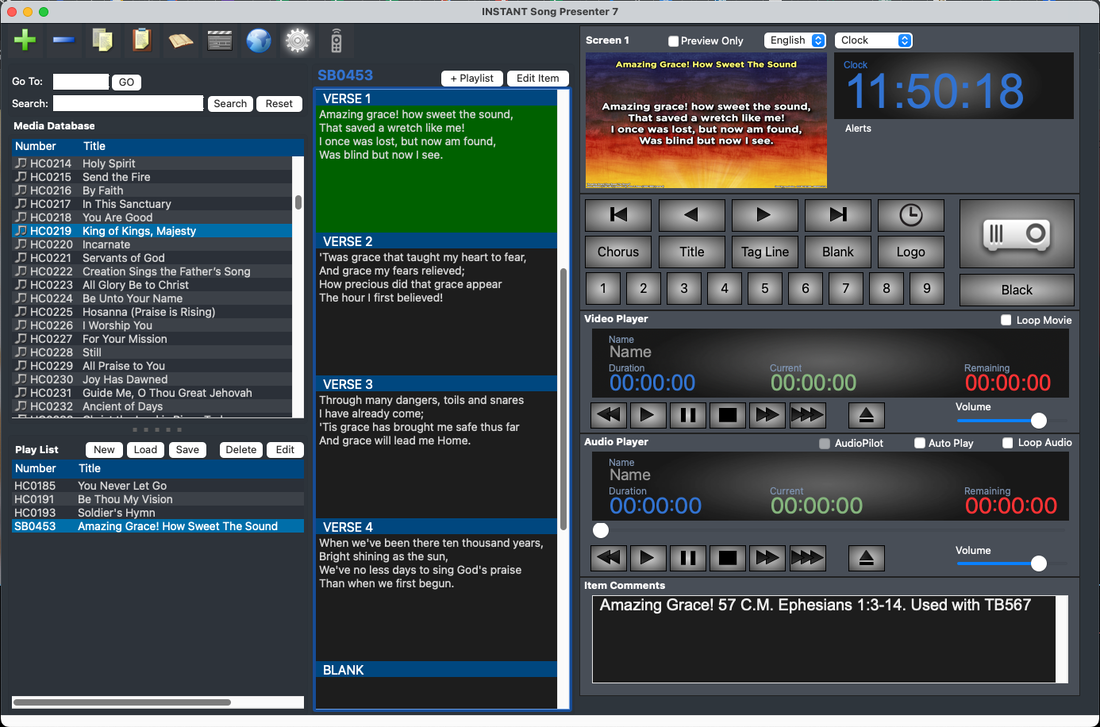
ISP 6 Video Overview
Get Your Free License
Visit our registration page to request your ISP Registration Code. Registering allows us to keep you updated on new releases and critical news.
Legacy Software Support
Older versions may no longer be actively supported
Installation Issues?
See support pages for ISP 5 deployment, especially for system administrators setting up non-admin user accounts. Update file v5.0.4.5 resolves startup preferences file errors.
Download Update Fix →ISP 5 Legacy Features
- Detachable Control Rack for flexible layout
- INSTANT Announcement overlay tool
- Dual-Language display configurations
- Independent Audio & Video background engines
- Widescreen display standard support